Digital Signage for Corporate Offices
Templates for Meeting Rooms, Internal Comms, and Lobbies
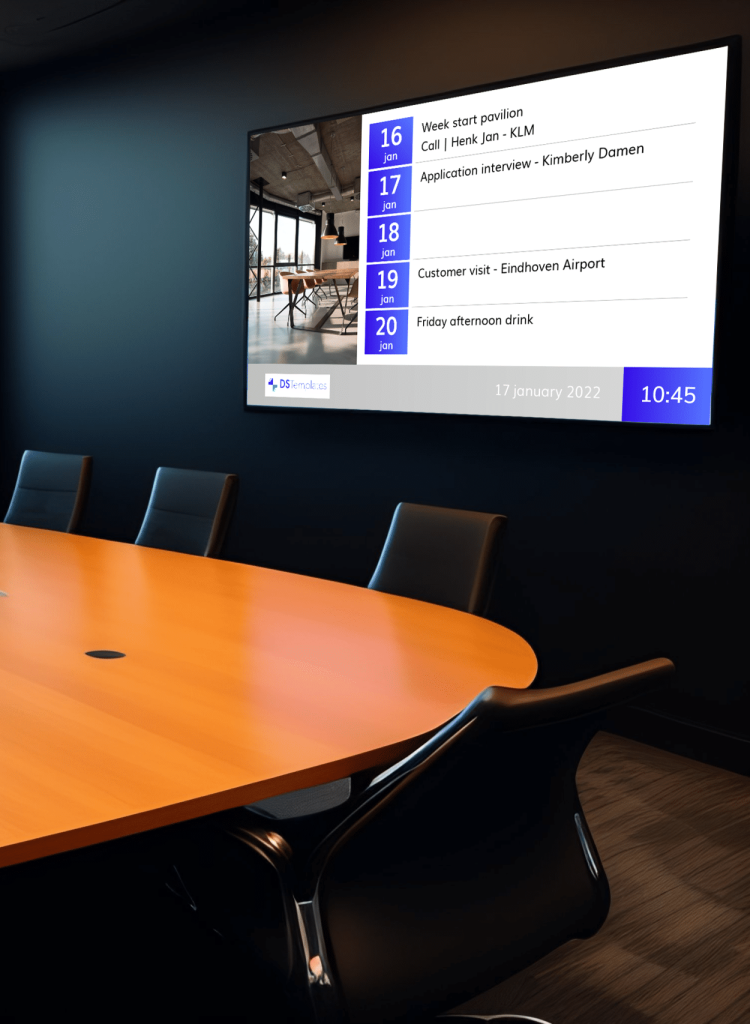
Modern offices use digital signage for meeting room management, internal communications, visitor welcome screens, and KPI dashboards. DS Templates offers 100+ corporate templates that integrate with Microsoft 365, Google Workspace, and SharePoint to keep employees informed and meeting rooms organized.
No credit card required.
Why Offices Need Digital Signage
Corporate offices waste an average of 30 minutes per employee per week on meeting room conflicts, missed announcements, and searching for information. Digital signage eliminates these inefficiencies by displaying real-time meeting room availability, company news, and operational data on screens throughout the office.
Companies using digital signage for internal communications report 47% higher employee engagement with company updates compared to email-only communication. Meeting room displays with calendar integration reduce double-bookings by up to 90% and no-shows by 25%.
- Meeting room availability (Google Calendar, Microsoft 365 integration)
- Internal communications and company news feeds
- KPI dashboards and business metrics (SharePoint, Power BI)
- Visitor welcome screens with personalized greetings
- Employee recognition and birthday boards
- Office wayfinding and floor directories
- Cafeteria menus and daily specials
- Safety information and compliance reminders
Corporate Template Categories
DS Templates provides a comprehensive set of corporate templates covering every office communication need, with native integrations for the tools your team already uses.
Best Practices for Corporate Digital Signage
Maximize the impact of digital signage in your office environment.
Meeting Room Integration
Connect every meeting room display to Google Calendar or Microsoft 365. Real-time availability, current meeting info, and one-touch booking reduce room conflicts and wasted time.
Content Mix
Rotate between company news (SharePoint/RSS), team achievements, KPIs, and practical info like cafeteria menus and weather. Variety keeps employees engaged with the screens.
Brand Consistency
Use your corporate colors, logo, and fonts across all screens. DS Templates makes brand customization simple, ensuring every display reflects your company identity.
Data-Driven Displays
Connect to SharePoint, Power BI, or RSS feeds for live data. Display sales targets, customer satisfaction scores, or project timelines that update automatically.
Visitor Experience
Lobby screens with personalized visitor welcome messages create a professional first impression. Integrate with visitor management systems for automated greetings.
Getting Started with Corporate Templates
Transform your office communication in three steps.
1. Audit Your Office Screens
Identify locations: meeting rooms (door displays), lobbies (welcome screens), common areas (news and KPIs), cafeteria (menus), and corridors (wayfinding).
2. Connect Your Tools
Integrate with Microsoft 365, Google Workspace, SharePoint, or RSS feeds. DS Templates connects to the tools your team already uses for seamless, automated content.
3. Launch and Manage
Customize templates with your brand, assign to screen locations, and publish. Manage all office screens from one central dashboard.
Corporate Digital Signage FAQ
Upgrade Your Office Communication
Meeting room displays, internal comms, and KPI dashboards. 100+ corporate templates with Microsoft 365 and Google integration.